


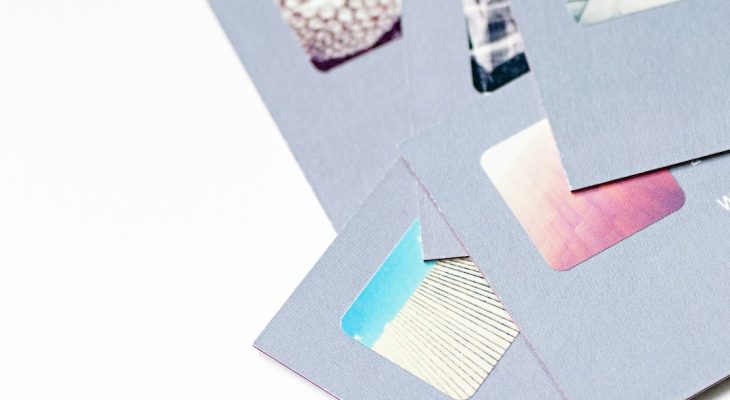
For many small businesses, a business card is still the fastest physical proof that a brand exists. It is handed out at meetings, slipped into packages, left at reception desks, and exchanged at local events where digital ads are easy to forget. Because owners often need professional materials quickly and cannot always hire a full design team, do it yourself branding tools have become a practical standard rather than a temporary shortcut.
TLDR: Small businesses often use simple business card platforms to create credible branding without waiting weeks or paying agency level fees. The four most practical tools are Canva, Adobe Express, VistaPrint, and MOO, each serving a different need from quick layout design to premium printing. The best choice depends on whether the priority is speed, visual flexibility, print convenience, or a higher end finish.
Why Business Card Tools Matter for Small Business Branding
A business card is small, but it carries a large branding responsibility. It must communicate a company name, visual style, contact details, and level of professionalism within a few seconds. For a small business, especially one operating locally or in a relationship driven field, a poorly designed card can weaken trust before a conversation even begins.
Modern business card tools solve several common problems at once. They provide templates, brand color controls, logo placement, typography options, and direct print ordering. This allows owners to move from idea to finished card much faster than traditional design workflows. More importantly, these platforms make basic brand consistency possible for companies that may not yet have a formal brand guide.
When people say that more than half of small businesses rely on DIY branding tools, they are usually referring to a broader shift: owners and small teams now handle many design tasks internally. That includes cards, flyers, social posts, menus, stickers, postcards, and packaging inserts. The four tools below are among the most recognized and widely used options for creating business cards quickly while maintaining a professional appearance.
1. Canva: Fast Layouts for Owners Who Need Design Simplicity
Canva is one of the most accessible tools for small business owners who want a professional looking business card without learning advanced design software. Its biggest strength is simplicity. Users can choose from thousands of templates, replace the sample text, upload a logo, adjust colors, and download or print the finished design.
For a new business, Canva is especially useful because it supports more than business cards. A company can create a card, Instagram post, flyer, presentation, sign, and email header using similar colors and fonts. That helps a small business build consistency even before it hires a designer.
Best for: owners who want speed, ease of use, and a broad library of templates.
Key advantages include:
- Large template selection: Users can start with layouts for consultants, restaurants, real estate agents, salons, tradespeople, and creative professionals.
- Basic brand control: Logos, colors, and fonts can be saved for repeated use across designs.
- Accessible editing: Drag and drop controls make it practical for non designers.
- Download and print options: Finished files can be exported or ordered through Canva’s print service.
The main caution is that popular templates can look familiar. A small business that uses Canva should make deliberate changes to the layout, colors, imagery, and typography. A template is a starting point, not a final identity. For a more serious look, avoid overcrowding the card, use a clean font pairing, and leave enough white space around contact information.
Professional recommendation: use Canva when the business needs a credible card quickly, but take time to customize the template so it does not look generic.
2. Adobe Express: Stronger Creative Control Without Full Design Complexity
Adobe Express is a practical choice for small businesses that want more polish than a basic template tool but do not need the full complexity of Adobe Illustrator or InDesign. It combines templates, image editing, brand kits, and quick resizing features in a format that is approachable for non specialists.
Adobe Express can be particularly valuable for businesses that already use Adobe products or want a design environment with a more professional creative foundation. The platform is useful for cards that need stronger visual hierarchy, sharper image handling, and more consistent brand use across digital and print materials.
Best for: small businesses that want a balance between convenience and more refined visual control.
Key advantages include:
- Professional design ecosystem: It connects well with other Adobe assets and workflows.
- Brand kits: Businesses can store approved logos, colors, and fonts for repeated use.
- Quick editing tools: Background removal, image adjustments, resizing, and layout changes are straightforward.
- Good for multi channel branding: A card design can be supported by matching social graphics, posters, and digital assets.
The strength of Adobe Express is not only the card itself, but the continuity it supports. A business card should not feel separate from the rest of the brand. If the same colors, logo, and tone appear on a website, invoice, brochure, and social profile, the business feels more established.
The limitation is that Adobe Express may still require a stronger design eye than highly guided platforms. It gives users freedom, and freedom can lead to inconsistent spacing, too many font styles, or unbalanced layouts. For best results, keep the design disciplined: one primary font, one supporting font, one strong logo placement, and a clear order of information.

3. VistaPrint: Convenient Design and Printing in One Place
VistaPrint is widely known for making business card printing accessible to small businesses. Its value is straightforward: users can design a card online, select paper stock and finish, approve the proof, and place an order without managing separate print vendors. For many owners, that convenience is the main reason to use it.
VistaPrint is especially useful for businesses that care less about advanced design flexibility and more about getting a clean, affordable card printed reliably. It offers many templates and product variations, including standard cards, premium styles, folded cards, loyalty cards, appointment cards, and matching marketing materials.
Best for: businesses that want a simple design process combined with dependable online printing.
Key advantages include:
- Integrated printing: Design and ordering happen in the same workflow.
- Budget friendly options: Small businesses can order cards without a large upfront investment.
- Multiple paper choices: Users can select finishes, thicknesses, and card styles based on budget and use case.
- Matching materials: Cards can be paired with flyers, stamps, signs, stickers, and packaging inserts.
For service based businesses, VistaPrint’s practical features are particularly useful. A hair stylist may need appointment cards. A contractor may need cards that fit inside estimate folders. A tutor, accountant, or local consultant may need a simple, clean card that can be reordered several times per year.
The main risk is choosing the cheapest available design without considering brand impression. A low cost card can still look professional, but the layout must be clean and the paper must support the message. A premium consultant, boutique, or specialist may benefit from heavier stock or a matte finish. A casual local service provider may be perfectly well served by a standard card with clear typography and durable paper.
Professional recommendation: choose VistaPrint when print convenience is the top priority, but review paper quality and spacing carefully before ordering in bulk.
4. MOO: Premium Cards for Businesses That Want to Stand Out
MOO is often selected by businesses that want a more distinctive physical impression. While it also offers online design and templates, its reputation is strongly tied to print quality, premium finishes, and memorable card formats. For companies where presentation matters, a carefully produced MOO card can help signal attention to detail.
MOO is a strong fit for photographers, designers, boutique retailers, consultants, luxury service providers, event professionals, and other businesses that benefit from tactile branding. The thickness of the card, finish, color accuracy, and overall feel can support the brand message before the recipient reads a single line.
Best for: businesses that consider the card an important part of the customer experience.
Key advantages include:
- Premium paper and finishes: Options may include thick stock, soft touch finishes, gloss effects, and special details.
- Distinctive formats: Businesses can create cards that feel less ordinary while remaining professional.
- High visual impact: Strong printing quality can support photography, illustration, and refined brand colors.
- Brand memorability: A card with excellent texture and finish is more likely to be kept.
The tradeoff is cost. MOO is typically not the cheapest option, and small businesses should be realistic about whether premium cards will produce a return. If the business gives out hundreds of cards at casual events, a lower cost printer may be more practical. If cards are shared selectively with high value prospects, partners, or clients, a premium card may be justified.
A serious business card does not need gimmicks, but it does need intention. If using MOO, the design should be restrained enough to let the material quality work. Heavy paper, clean typography, and a confident use of space can communicate professionalism more effectively than bright colors and excessive decoration.
How to Choose the Right Tool
The best business card platform depends on the business goal. A new company preparing for its first networking event may need speed more than perfection. An established service provider may need consistent reorders. A boutique brand may need a card that feels premium. A growing company may need a tool that supports a broader visual system.
Use this simple decision guide:
- Choose Canva if you need the fastest path to an attractive design and want templates for many other marketing materials.
- Choose Adobe Express if you want stronger creative control and better alignment with a broader brand system.
- Choose VistaPrint if you want a convenient design to print process with affordable ordering and reordering.
- Choose MOO if the card must create a premium impression and the budget allows higher quality production.
Practical Standards for a Professional Business Card
No tool can compensate for unclear information or careless design choices. Regardless of platform, a serious business card should include only what is necessary: business name, personal name if relevant, role or service category, phone number, email address, website, and one primary social or location detail if it supports the buying decision.
Follow these standards:
- Keep text large enough to read comfortably.
- Use strong contrast between text and background.
- Avoid using more than two typefaces.
- Leave clear margins so the card does not feel crowded.
- Use the same logo, colors, and wording used on your website and invoices.
- Order a small test batch before committing to a large quantity.
It is also wise to think beyond appearance. A business card must be accurate, durable, and appropriate for its audience. A card for a law office should not use the same style as a children’s party business. A card for a restaurant may need stronger visual flavor, while a financial consultant may need restraint and clarity. The design should match the level of trust the business is asking customers to place in it.
Final Assessment
DIY business card tools have made professional branding more accessible to small businesses, but the best results still come from disciplined choices. Canva, Adobe Express, VistaPrint, and MOO each offer a serious path to fast business card creation, provided the owner understands the strengths and limits of each platform.
For most small businesses, the right approach is not to chase the most elaborate design. It is to create a card that is clear, consistent, well printed, and aligned with the brand’s promise. A business card should make it easy for someone to remember the company, contact it, and trust it. When used thoughtfully, these tools can help a small business move quickly while still presenting itself with professionalism and confidence.