


Walking into an office should feel smooth. Not like a treasure hunt for a pen, a badge, and someone named “Dave from reception.” That is where Sign In App steps in. It is a visitor management platform that helps businesses welcome guests, track staff, manage deliveries, and keep the front desk calm.
TLDR: Sign In App is a clean, flexible visitor management tool for offices, schools, warehouses, and multi-site teams. It replaces paper logbooks with digital check-ins, badges, alerts, and compliance tools. For example, a company with 60 visitors per day could save around 30 to 45 minutes daily by automating sign-ins and host notifications. It is strong, but competitors like Envoy, SwipedOn, and Proxyclick may suit some teams better.
What Is Sign In App?
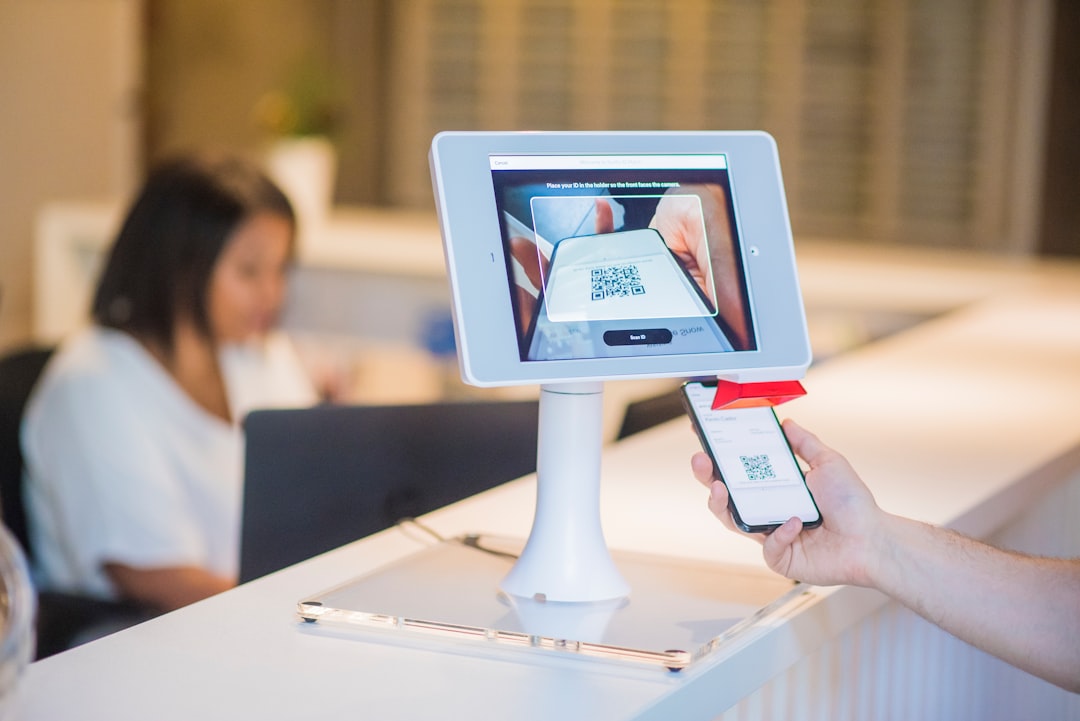
Sign In App is a digital visitor management system. It lets people check in using a tablet, QR code, smartphone, or kiosk. It records who is on site, why they are there, and who they are visiting.
Think of it as a digital front desk helper. It does not drink coffee. It does not lose the pen. It does not forget to tell Sarah that her 10:00 meeting has arrived.
The platform is used by many types of organizations, including:
- Offices and coworking spaces
- Schools and colleges
- Factories and warehouses
- Healthcare sites
- Construction locations
- Multi-location businesses
Its biggest job is simple. It helps you know who is in the building at any moment.
Main Visitor Management Features
1. Digital Visitor Check-In
Visitors can sign in on a tablet or by scanning a QR code. They enter their name, company, purpose of visit, and host. You can also ask custom questions.
For example, a warehouse may ask, “Have you completed safety training?” A school may ask for ID details. A corporate office may ask visitors to accept an NDA.
This is much neater than a paper book. It is also more private. Nobody can peek at the names of earlier visitors.
2. Host Notifications
When a guest arrives, the host gets an alert. This can be sent by email, SMS, or app notification. No more wandering visitors. No more reception team calling three different people.
This feature is small. But it feels big in daily use. It makes arrivals faster and less awkward.
3. Badge Printing
Sign In App can print visitor badges. These may include a name, photo, company, time, and host name.
Badges help staff identify visitors quickly. They also add a professional touch. A badge says, “Welcome, you are expected.” A sticky note says, “We tried.”
4. Staff Sign-In
The platform is not just for guests. Employees can also sign in and out. This is useful for hybrid teams, fire safety, and shared workplaces.
Managers can see who is on site. Staff can mark themselves as working remotely, in the office, or off site. This helps with planning and emergency roll calls.
5. Fire Evacuation Reports
This is one of the most important features. In an emergency, you need a live list of people on site. Sign In App provides this on mobile devices.
Fire marshals can check people off during evacuation. This is far better than grabbing a paper book and hoping it is up to date.
6. Pre-Registration
Hosts can pre-register visitors before they arrive. Guests may receive an invite with directions, parking notes, forms, and check-in instructions.
This makes the visit feel organized from the start. It is great for interviews, client meetings, training sessions, and events.
7. Documents and Compliance
You can ask visitors to read and accept documents. These may include safety rules, privacy notices, NDAs, or health policies.
The system keeps a record of acceptance. This is handy for audits. It is also handy when someone says, “Nobody told me.” The system politely says, “Actually, yes.”
Image not found in postmetaWhat Makes Sign In App Easy To Use?
The interface is simple. That matters. Visitor management software should not need a training course and a small emotional support group.
Admins can adjust the sign-in flow. They can add questions, change branding, manage locations, and set visitor types. The visitor screen can display your logo and welcome message.
The process is usually fast:
- Visitor arrives.
- They tap the screen or scan a QR code.
- They enter details.
- They accept any documents.
- The host gets notified.
- A badge prints if needed.
Simple. Tidy. Much less “Where is the clipboard?” energy.
Best Use Cases
Sign In App is a strong fit for teams that care about safety, visibility, and a polished front desk.
It works especially well for:
- Schools: Track visitors, contractors, staff, and late arrivals.
- Offices: Welcome clients and manage hybrid workers.
- Factories: Share safety documents before entry.
- Multi-site teams: Use one system across several locations.
- Events: Speed up arrivals and print name badges.
If your site has many guests, contractors, or flexible workers, it can reduce admin work fast.
Possible Downsides
No tool is perfect. Sign In App is flexible, but some teams may find setup takes time. Custom questions, visitor types, alerts, and documents need planning.
Also, smaller teams with only a few visitors each week may not need all the features. A very small office may feel the system is more powerful than required.
Hardware is another point. If you want a polished kiosk, badge printer, and tablet stand, you may need extra equipment. That can add cost.
Top Sign In App Competitors
1. Envoy
Envoy is one of the biggest names in visitor management. It has strong workplace features, including desk booking, deliveries, room scheduling, and employee tools.
Choose Envoy if you want a broader workplace platform. Choose Sign In App if you want a focused and flexible visitor sign-in experience.
2. SwipedOn
SwipedOn is simple and friendly. It offers visitor check-in, employee in/out boards, contactless sign-in, and evacuation reports.
It is a good option for small and mid-sized businesses. It may feel lighter than Sign In App for complex sites, but that can be a benefit if you want speed.
3. Proxyclick
Proxyclick is popular with enterprise teams. It offers security-focused visitor management, access control integrations, watchlists, and compliance features.
It may suit large companies with strict security needs. Sign In App may feel easier for teams that want strong tools without too much complexity.
4. The Receptionist
The Receptionist is known for being easy to use. It handles visitor check-in, notifications, badge printing, and visitor logs.
It is a nice option for offices that want a virtual front desk. Sign In App may offer more depth for staff tracking and multi-site management.

How To Choose The Right Tool
Before choosing, ask a few plain questions:
- How many visitors arrive each day?
- Do we need staff sign-in too?
- Do we need badge printing?
- Do visitors need to accept safety documents?
- Do we manage more than one site?
- Do we need emergency evacuation lists?
If you answer “yes” to several of these, Sign In App is worth a close look.
Final Verdict
Sign In App is a strong visitor management system with practical features. It improves check-in speed, site safety, compliance, and the overall guest experience.
It is best for teams that want more than a basic digital logbook. Schools, offices, warehouses, and multi-site companies can get real value from it.
Its competitors are good too. Envoy is great for workplace management. SwipedOn is very simple. Proxyclick is strong for enterprise security. The Receptionist is friendly and easy.
But if you want a flexible tool that keeps the front desk neat, the staff informed, and the visitor experience smooth, Sign In App is a smart pick. It turns the old sign-in book into something useful. And yes, it finally retires that sad pen on a string.